Frames and weldments
Build welded steel or timber frames from a skeleton of lines and arcs: pick a
profile, choose how corners are cut, add gussets and end caps, and get a cut
list. This is the cadbuildr-frames library, built on Foundation.
Prerequisites: pip install cadbuildr-frames (it installs
cadbuildr-foundation).
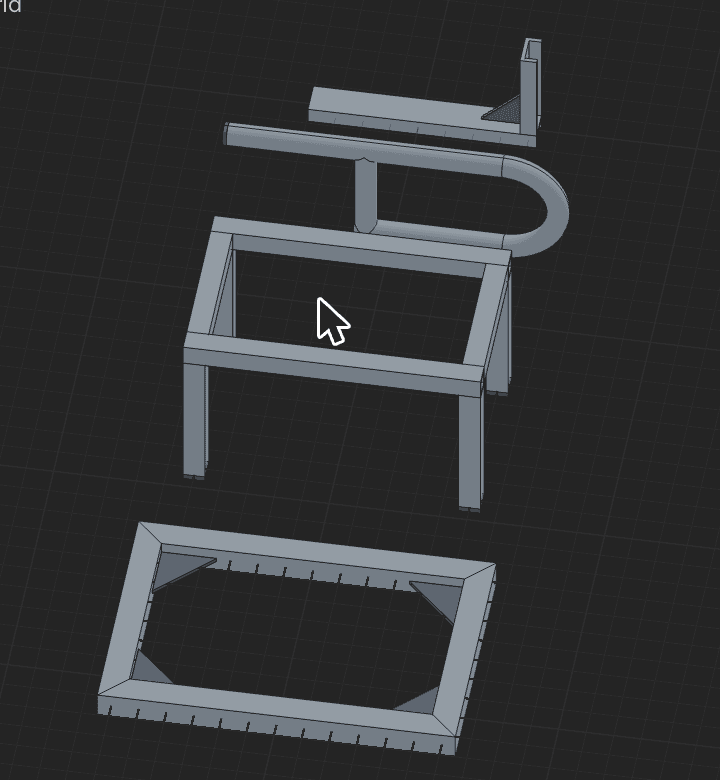
Make a mitered frame
from cadbuildr.foundation import show
from cadbuildr.frames import Frame, Gusset, SquareTube, rectangle

# 600 x 400 mm rectangle; the skeleton is the tube centreline
frame = Frame(
    skeleton=rectangle(600, 400),
    profile=SquareTube(40, 3),
    corner="miter",
    gussets=[Gusset(at=(x, y, 0), size=60, thickness=4)
             for x in (-300, 300) for y in (-200, 200)],
)
print(frame.cut_list_table())
show(frame)
Item Qty Profile Length Angle 1 Angle 2 Ends
---- --- ----------- ------ ------- ------- -----------
1 2 SHS 40x40x3 640.0 45.0 45.0 miter/miter
2 2 SHS 40x40x3 440.0 45.0 45.0 miter/miterFrame is an Assembly. Each member is its own Part (member_1,
member_2, … in skeleton order), so exports and BOMs list real cut pieces.
Skeleton
| Helper | What it makes |
|---|---|
Line3D(start, end) | a straight segment (mm) |
Arc3D(start, through, end) | a bent segment through three points |
rectangle(width, depth, center=(0, 0, 0)) | a closed rectangle in the XY plane |
polyline(points, closed=False) | straight segments through points |
box_edges(width, depth, height) | the 12 edges of a box or table frame |
Segments that share an end point are joined. An end that lands in the middle of another straight member is a T-junction.
Profiles
| Profile | Arguments |
|---|---|
SquareTube(size, wall) | square hollow section |
RectTube(width, height, wall) | rectangular hollow section |
RoundTube(diameter, wall) | round tube |
RoundBar(diameter), RectBar(width, height) | solid round bar, flat bar |
Angle(width, height, thickness) | L section |
Channel(height, width, web, flange) | C channel |
IBeam(height, width, web, flange) | I / H beam |
Lumber("2x4") | dimensional lumber at its dressed size |
A profile is centred on the skeleton. Its first dimension lies across the
member in the frame’s plane; its second points to the up side (the
skeleton’s plane normal, or +Z). Pass up=(x, y, z) to change it, or one
profile per segment as a list.
Corners
corner= | Two members meeting at an angle |
|---|---|
"miter" (default) | both cut on the bisector |
"butt" | the longer member runs through; the other is trimmed to its face |
"coped" | like butt, but the trimmed member is cut to the outside of the through member (round tubes) |
Where three or more members meet, and at T-junctions, the longest member runs
through and the others are butted to it (coped with corner="coped").
Collinear and tangent ends continue without a cut.
Gussets, end caps and the cut list
from cadbuildr.frames import EndCap, Frame, Line3D, SquareTube, polyline

corners = [(-400, -250), (400, -250), (400, 250), (-400, 250)]
top = polyline([(x, y, 700) for x, y in corners], closed=True)
legs = [Line3D((x, y, 700), (x, y, 0)) for x, y in corners]
table = Frame(top + legs, SquareTube(40, 3), end_caps=EndCap(thickness=3))

for row in table.cut_list():
    print(row.count, row.profile, row.length, row.end_angles, row.end_cuts)
Gusset(at=corner, size=60, thickness=5, position="center")puts a triangular plate in a two-member corner.positioncan be"center","top"or"bottom"(flush with that face).EndCap(thickness=3)closes every free end with a plate.frame.cut_list()groups identical members:profile,length(long point to long point, mm),end_angles(degrees from square),end_cuts,count,members, andbend_radiusfor bent members.frame.cut_list_table()prints it.